
Overview
The Elevar API lets you push ecommerce events from your site and route them to marketing platforms. Events are automatically enriched with user identity, consent state, and attribution data before being forwarded to your live destinations. You focus on pushing the right events at the right time.
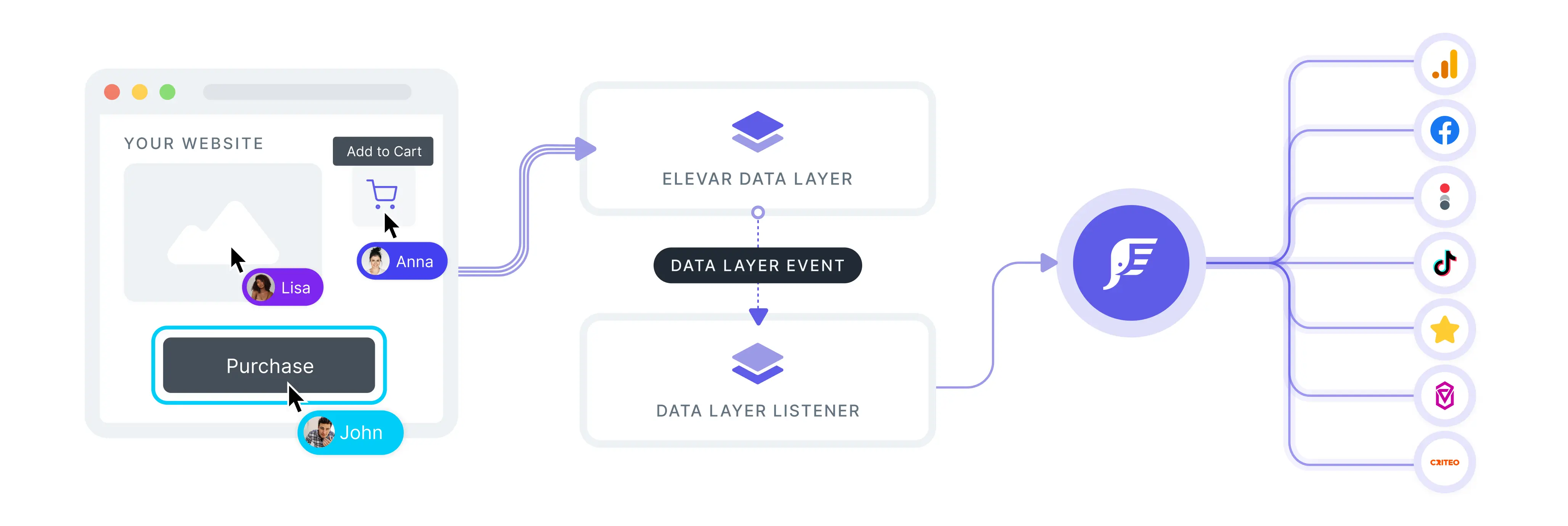
Implementation Paths
The setup process varies based on your platform architecture. All customers start with the Browser Setup, then follow additional steps based on their integration type.
INFO
Not sure which path to follow?
- Shopify Headless (custom storefront with headless backend) → Browser Setup + Headless
- Platform Agnostic (Non-Shopify with full checkout control) → Browser Setup + Agnostic
Browser Setup
Required for ALL customers
All implementations start here. The Browser Setup configures the core Elevar tracking functionality on your website.
Steps to Complete
- Install Scripts - Install Elevar tracking scripts on your site
- Push Events - Implement the standard ecommerce events
- Debug Mode - Verify your implementation is working correctly
- User ID - Pass your own user identifier
- Proxy Path - Work around ad blockers
INFO
After completing this section, proceed with your architecture-specific steps.
Headless
Only for Shopify Headless integrations
WARNING
Complete the Browser Setup setup before starting this section.
If you're implementing on a custom storefront with a headless commerce backend (e.g., using Next.js, Remix, Hydrogen, or similar frameworks), follow these additional steps after completing the Browser Setup:
- Shopify Source - Connect our app embed into your live theme
- Market ID - Configure market identification for multi-region stores
- Checkout URL - Set up checkout URL handling for headless flows
Agnostic
Only for non-Shopify integrations
WARNING
Complete the Browser Setup setup before starting this section.
If you have complete control over your checkout process and platform architecture, and you're implementing on a non-Shopify ecommerce platform, follow these steps after completing the Browser Setup:
- API Source - Configure browser scripts and server credentials
- Checkout Events - Implement the Data Layer checkout events
- Server Setup - Send events directly from your server
Additional Resources
After completing your implementation path, explore these resources:
- Refreshing Context - Understanding context refresh behavior
- Overarching Domain - How to find the main overarching domain