
Debug Mode Codes
Reference guide for debugger error codes, warnings, and info messages.
Overview
Follow this guide to understand the messages returned by the Elevar Debugger when validating your Data Layer implementation.
When validating your own Data Layer following this guide, our debugger tool tries to alert you of as many issues as possible so that you can proactively address them. While the tool doesn't cover all scenarios, when purchasing our Headless Audit, an Elevar Analyst will manually review your Headless Data Layer and help you address scenarios that our Debugger tool did not alert you of.
The debugger returns three categories of messages:
- Error: These will be red in color. They alert you of definite issues. (e.g. duplicate events occurred).
- Warning: These will be yellow in color. They will warn of potential issues (e.g. Consent Mode is enabled, but we haven't received consent values).
- Info Codes: These will be gray in color. They share information about the event (e.g. this event passed validation).
The sections below explain each message type and how to address it.
Error Codes
BAD_EVENT_DATABAD_EVENT_ORDERDUPLICATE_EVENTCUSTOM_PIXEL_OUT_OF_DATECART_RECONCILIATION_ENABLEDMISSED_CONTEXT_INVALIDATIONMISSING_GOOGLE_TAG_MANAGERTRANSFORM_FN_ERROR_THROWNTRANSFORM_FN_BAD_RETURNUSERID_FN_ERROR_THROWNUSERID_FN_BAD_RETURNUNEXPECTED
BAD_EVENT_DATA
Description: Indicates that one or more required event properties are missing or incorrectly formatted.
Common Causes:
- Empty string provided for a required value
- The
imageproperty in theproductsarray does not start with a protocol. - The
product_idorvariant_idvalues are not stringified numbers only.
Resolution: Ensure all required properties are populated and formatted correctly. Refer to the browser error message for specific validation failures.
BAD_EVENT_ORDER
Description: Indicates that a required dl_user_data event did not fire immediately before certain events.
Affected Events:
dl_view_cartdl_purchasedl_view_search_resultsdl_begin_checkout
Resolution: Ensure a dl_user_data fires first upon a page change.
Note: Can not validate against dl_view_item, dl_add_to_cart, dl_remove_from_cart, dl_view_item_list, dl_select_item, dl_add_shipping_info, and dl_add_payment_info as there are scenarios where these can fire without being immediately proceeded by a dl_user_data.
DUPLICATE_EVENT
Description: Indicates that two identical non-user-data events fired with no context push between them. An identical event refers to all non-generated properties being the same between two events. Issues with the dl_user_data event will be captured by the MISSED_CONTEXT_INVALIDATION error.
Details: Identical events share all non-generated properties. Generated properties include:
event_idevent_timeevent_state
Resolution: Remove duplicate Data Layer events so only one instance fires per interaction.
CUSTOM_PIXEL_OUT_OF_DATE
Description: Our custom pixel script does not have all the data it needs.
Details: Older custom pixel snippets didn't pass data required to listen for consent updates via Shopify's Customer Privacy API.
Resolution: If you don't need to customize checkout tracking, move to our app pixel instead of the custom pixel to allow us to manage changes for you going forward. If you do need to customize checkout tracking, update the custom pixel to use our latest custom pixel snippet.
- Navigate to "My Tracking" in our app, and open the Shopify Source.
- Once in the Shopify Source, go to the "General Settings" step.
- Expand "Advanced Options", and find the "Web Pixel Settings" section.
- Either move to the app pixel, or use the new custom pixel snippet.
- Hit "Save" at the bottom of the page.
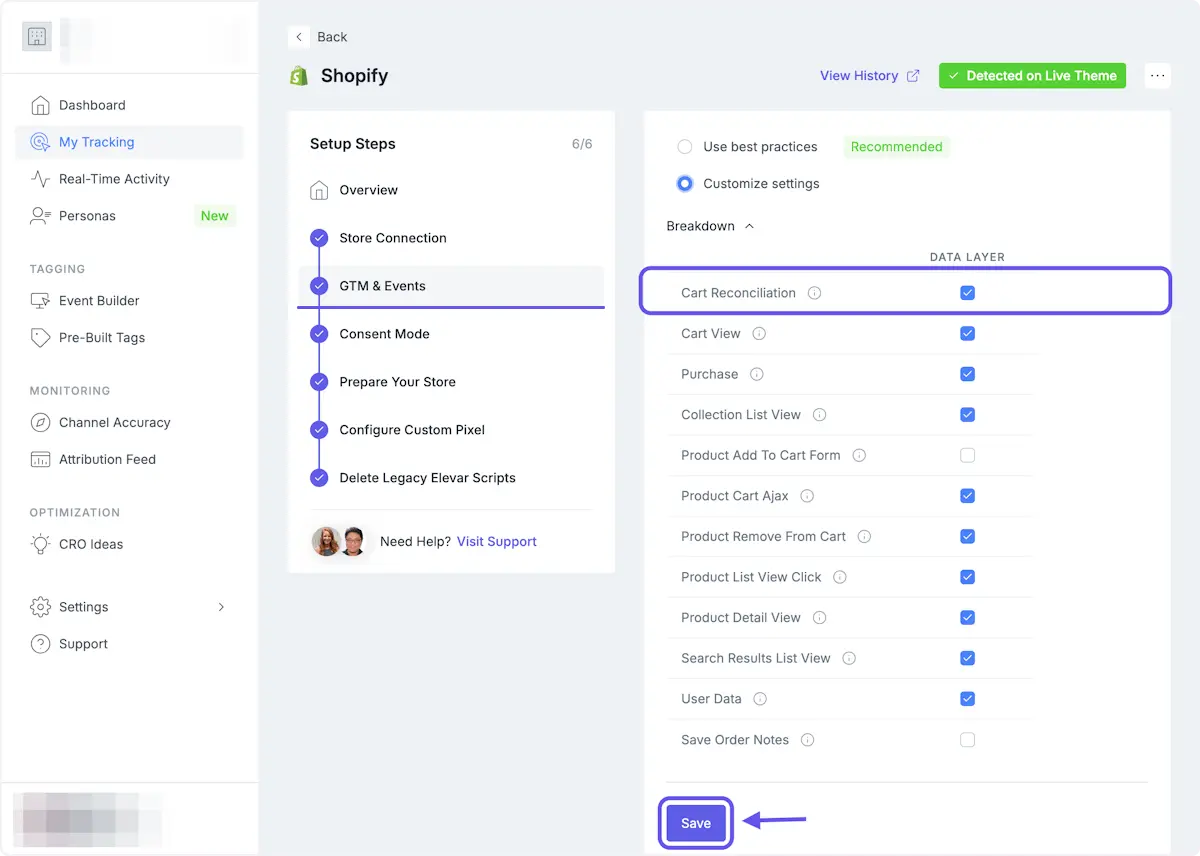
CART_RECONCILIATION_ENABLED
Description: The "Cart Reconciliation" event handler is enabled when using the "Non-Shopify Subdomains" Source snippet.
Details: This can cause duplicate cart events on headless sites, and doesn't fire as expected on SPAs. We recommend disabling it if you are headless.
Resolution: Disable the "Cart Reconciliation" event handler.
- Navigate to "My Tracking" in our app, and open the Shopify Source.
- Once in the Shopify Source, go to the "General Settings" step.
- Expand "Advanced Options", and find the "Event Handlers" section.
- Click "Customize Settings", and uncheck "Cart Reconciliation".
- Hit "Save" at the bottom of the page.
MISSED_CONTEXT_INVALIDATION
Description: Indicates that multiple dl_user_data events fire without a context push in between them.
Resolution: Fire this utility when route changes occur.
MISSING_GOOGLE_TAG_MANAGER
Description: Indicates that Google Tag Manager was not detected on the site.
Details: The debugger checks for window.google_tag_manager after a 15-second delay.
Resolution: Ensure GTM is properly installed on the website by following this guide.
TRANSFORM_FN_ERROR_THROWN
Description: Indicates that a Transform Function is throwing an error during execution.
Resolution: Review the Transform Function implementation and correct any errors.
TRANSFORM_FN_BAD_RETURN
Description: Indicates that the Transform Function returned data in an invalid format.
Example:
- Returning a number instead of an object
Resolution: Ensure the function returns data in the expected format by following the formatting noted here.
USERID_FN_ERROR_THROWN
Description: Indicates that the User ID Function is throwing an error.
Resolution: Verify the function logic and ensure it executes without errors using the User ID function.
USERID_FN_BAD_RETURN
Description: window.ElevarUserIdFn returned an invalid value.
Example:
- Returning an empty string
- Returning a number instead of a string
Resolution: Ensure the value returned is a non-empty string, and don't set window.ElevarUserIdFn if it is an empty string.
UNEXPECTED
Description: Indicates an unclassified error that does not match predefined categories.
Resolution:Reach out to our Support Team with the exact error message.
Warning Codes
CONSENT_CHECK_LIMIT_REACHED
Description: No consent values were received from the Consent Management Platform within 15 seconds.
Resolution: Ensure your CMP is correctly passing consent values to Google Consent Mode by following this guide.
LOCAL_STORAGE_ACCESS_DENIED
Description: The script could not access local storage.
Details: Local storage is used for attribution and cart data.
Resolution: Ensure local storage is enabled in the browser.
CUSTOM_PIXEL_NOT_NEEDED
Description: Our custom pixel script is executing unnecessarily.
Details: Our custom pixel is not needed when using our app pixel.
Resolution: Remove our custom pixel from within your Shopify admin.
Info Codes
VALIDATION_PASS
Description: The event passed validation with no detected issues.
CONTEXT_PUSHED
Description: The debugger tool noted that a context push was triggered.